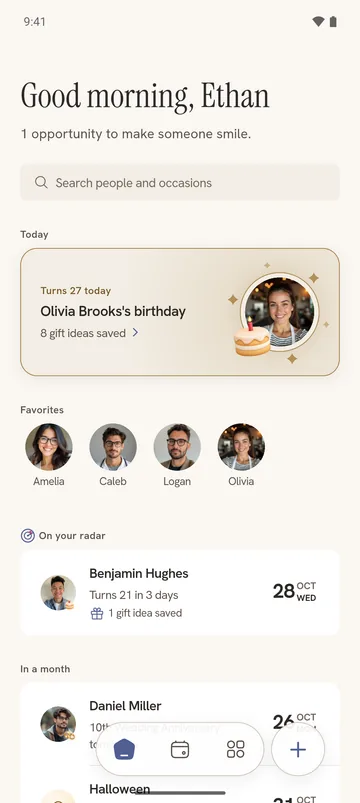
If you want a Birday alternative with a place for gift ideas and different reminder schedules for different people, Dearly brings those features together in a free Android app with no ads.
Birday is also free and ad-free. It offers widgets, countdowns and dark and AMOLED themes, so those features alone are not reasons to switch. The useful choice is between Dearly’s planning around each person and Birday’s open-source tools, event notes and backups.
We make Dearly. Here is how the two apps compare.
Dearly vs Birday: features compared
| Feature | Dearly | Birday |
|---|---|---|
| Cost and ads | Free, no ads | Free, no ads |
| Occasion types | Birthdays, anniversaries, adoption days and memorial dates | Birthdays, anniversaries, name days and memorial dates |
| Birthday reminders | Different schedules for groups of people | On-day and advance reminders; favorites-only option |
| Contact import | Review and copy selected contact dates | Contacts or calendar; automatic import option |
| Gift ideas and notes | Gift ideas list and Little things per person | Notes per event |
| Widgets and countdowns | Upcoming occasions and countdown widgets | Home screen widgets and event countdowns |
| Birthday calendar | List and month-by-month calendar | Event timeline and yearly overview |
| Look and feel | Person pages, occasion cards, light, dark and AMOLED modes | Material 3 design, light, dark and AMOLED themes |
| Exporting your list | Not available | Backups and file import/export |
Details come from the Dearly and Birday Google Play listings and Birday’s feature guide.
Birthday reminders with time to plan
Some birthdays need a message on the day. Others need time to order a gift or arrange a visit. Dearly lets you put people into reminder groups and choose a schedule for each group.
For example, family can get several advance reminders while colleagues stay on an on-day schedule. Changing a group’s schedule changes it for everyone assigned to that group.
Birday offers on-day and advance alerts, including an option to notify you only about favorite events. If that already fits the way you plan, consider whether Dearly’s reminder groups would make a useful difference for you.
Save gift ideas with each person’s birthday
A friend mentions three books they would like. In Dearly, save each as a gift idea on their page. Keep preferences such as their favorite author or coffee order in Little things. When a reminder arrives, those ideas are there to help you choose.
Birday’s event notes can hold gift suggestions too. Dearly gives individual ideas their own entries and keeps them with the person, alongside their birthdays and anniversaries.
How to move birthdays from Birday to Dearly
- Check which birthdays and anniversaries are also saved in your phone’s Contacts app.
- Open Import from contacts in Dearly, review the people and dates, and choose what to add.
- Add dates saved only in Birday manually, copy any notes you want to keep, then choose reminder groups and allow notifications.
Dearly imports a copy of your contact dates. It does not keep them continuously synced or restore a Birday backup. Keep your old list while checking the new one. If being able to export your dates is essential, Birday already offers that; Dearly currently does not.
For more options, see our best birthday reminder apps for Android guide. Our birthday reminders on Android guide covers notification setup.
A look inside Dearly
Here is how upcoming birthdays and anniversaries look together in Dearly.