If you are looking for a Birthdays: Reminder & calendar alternative with no ads, Dearly brings birthday reminders, gift ideas and the little things about each person together in one Android app.
Birthdays already offers notes, widgets and countdowns, as well as age and zodiac details and quick ways to send wishes. Dearly is useful when you want a separate gift ideas list and different reminder schedules for groups of people.
We make Dearly. Here is how the two apps compare.
Dearly vs Birthdays Reminder & Calendar: features compared
| Feature | Dearly | Birthdays |
|---|---|---|
| Cost and ads | Free, no ads | Free with ads and in-app purchases |
| Occasion types | Birthdays, anniversaries, adoption days and memorial dates | Birthdays, anniversaries, memorial dates and other events |
| Birthday reminders | Different schedules for groups of people | On-day and advance reminders |
| Contact dates | Review and copy selected contact dates | Read and edit address-book birthdays and anniversaries |
| Gift ideas and notes | Gift ideas list and Little things per person | Notes per person and event |
| Home screen widgets | Upcoming occasions and countdown widgets | Upcoming-event widgets in different sizes |
| Countdowns | Birthdays and custom dates | Event countdowns |
| Look and feel | Person pages, occasion cards, light, dark and AMOLED modes | Date-focused view with age and zodiac details |
| Exporting your list | Not available | Backups and device-to-device transfer |
Details come from the Dearly and Birthdays Google Play listings.
An ad-free birthday reminder app with gift ideas
Dearly has no ads. Gift ideas have their own place on each person’s page, so you can save a book they mentioned or an experience they would enjoy. Use Little things for preferences you want to keep, such as their coffee order or favorite color.
Birthdays lets you save notes for people and events, which can already hold a gift suggestion. Dearly is worth considering if you would rather keep several ideas as separate entries alongside the person’s occasions.
If sending wishes or seeing zodiac details is your main reason for using Birthdays, weigh that before moving your list. The best fit depends on what you want to do when a reminder arrives.
Birthday and anniversary reminders with time to plan
In Dearly, each reminder group has its own schedule. Give family several advance reminders to leave time for a gift or a visit, and keep colleagues on an on-day schedule. Everyone in a group follows the same settings.
Both apps can show upcoming occasions on your home screen. Dearly also lets you make custom countdowns for a reunion, trip or another date you look forward to. Widgets and countdowns are useful shared features; the gift list and reminder groups are the reasons to consider Dearly.
How to move your birthday list to Dearly
- Check which birthdays and anniversaries are saved in your phone’s Contacts app, rather than only inside Birthdays.
- Open Import from contacts in Dearly, review the people and dates, and choose what to add.
- Add any missing dates, copy notes you want to keep, then choose reminder groups and allow notifications.
Dearly imports a copy of the dates you select, so later changes in Contacts do not automatically change that copy. A Birthdays backup or device transfer cannot be restored directly into Dearly. Keep your previous list until you have checked the people, dates and notes you need.
For more options, see our best birthday reminder apps for Android guide. Our birthday reminders on Android guide covers notification setup.
A look inside Dearly
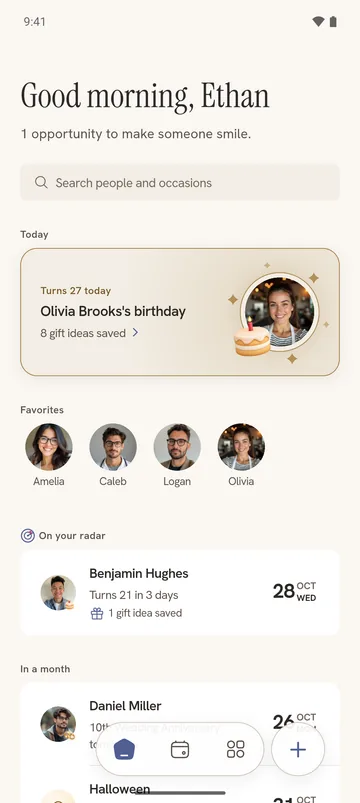
Here is how upcoming birthdays and anniversaries look together in Dearly.